08 November 2013

Improvements to the Deep-Sky Planner Community

Some improvements appeared this week in the Deep-Sky Planner Licensed Users' Community at knightware.biz. The improvements appeared in the Observing Plan Library and the Equipment Library. The changes make viewing data more efficient.

The old library viewing pages allowed users to page through items in the library. Items were listed in alphabetical order, 10 items per page. The libraries have grown in size so that paging through the data was no longer a sufficient way to navigate the contents.

The new library viewing pages are much more suited to the number of items in the libraries. Now items in a library can be sorted, filtered and searched. Users can also set the number of items viewed per page so that there is far less paging through the library while looking for plans and equipment. For example, the Plan Library can be filtered for plans whose names contain the word 'binocular', or the plans can be sort by their upload date. These capabilities should make using the Plan Library much easier as it continues to grow in size.

Observing Plan Library web page

Speaking of Growth

The Deep-Sky Planner 6 Plan Library has grown to nearly 300 pre-built observing plans. There are plans related to observing books, star parties and organizations. There are also plans that accompany popular monthly magazines and online articles:
  • Binocular Universe (cloudynights.com): Plans that accompany Phil Harrington's monthly 'Binocular Universe' article on CloudyNights.com have been added to the Plan Library since December 2012. These plans hold a nice mix of objects for binocular observers every month.
  • Deep-Sky Tour (Sky At Night magazine): Plans that accompany Steve Richards' monthly 'Deep-Sky Tour' column in Sky At Night magazine have been added to the Library since December 2011. These plans contain objects appropriate for small telescope observers. The plan file also appears on the coverdisc CD that accompanies each issue, along with a version of the plan file for Argo Navis devices. They are located in the Software section of the CD.
  • New! Deep-Sky Wonders (Sky & Telescope magazine): Plans that accompany Sue French's monthly 'Deep-Sky Wonders' column in Sky & Telescope magazine are being added to the Plan Library starting December 2013. These plans contain objects appropriate for medium to large sized telescopes every month.

These plans are very handy to use when you are working through an observing list in a magazine or a book, or you haven't had time to prepare a custom plan of your own. They can also be viewed by licensed users with a web browser on any mobile device directly from the Plan Library.

25 October 2013

Dark Sky Readings

Knightware is keenly aware that light pollution is ruining stargazing for observers around the world. Measuring the darkness of the sky is useful to many pursuits beyond the simple visual observer. Astro-imagers use the measurements to estimate exposures; biologists use them to study various affects on humans and animals. The importance of gathering such data is explained in last month's post, entitled 'Why is the Skyglow Observations Standard Format Important?'.

Gathering Readings Data Automatically

Knightware added a feature to its astronomy software entitled SQM Reader Pro 2 that sends readings acquired from the user's Sky Quality Meter to the Knightware website, knightware.biz. Sending readings to this webpage is optional, and the exact location of the meter is altered a small amount to protect the privacy of the contributor.

Send reading to Knightware

Displaying Readings Data

The contributed readings data are displayed on a Google Map for public viewing at http://www.knightware.biz/community/public/sqm2/sqm_map.php. In the month since the software was released, 14,000 readings have been contributed from 9 meter installation sites. The number of readings is high because some users are contributing data as often as once per minute. Others are contributing less frequently. Readings are only accepted when the sun is below the horizon at the location of the meter.

SQM Readings Map

Knightware has been working on back-end data management tools to keep the data 'cleaned up'. Work on these tools is nearly complete. One  problem that we've already seen is that sometimes readings are submitted for a single meter at multiple meter installations over a few days. A meter installation is defined as the meter serial number, latitude, longitude and time offset from GMT. That essentially describes the hardware and it's location, and it is represented on the map as a marker with a number on it. It looks like some users change the latitude and longitude of the meter slightly to refine it's position on the map. When this pattern is detected, Knightware can move all of the readings to the meter installation that seems to be the final, corrected one. If a user sees their contributed data condensed into one map marker, that's why.

The public map displays a marker for each meter installation with a number on it. The number indicates the last reading reported for the meter location with fractional digits truncated. By clicking on a marker, a user can see the date & time of the reading in both local and universal time, the reading data in both MPSAS and NELM, and the moon's altitude and phase. The mean and standard deviation of all readings received over the latest 12 months from the meter installation with the moon below the local horizon are also shown.
Meter Installation Detail
Once the back-end tools are complete, Knightware will begin working on other tools for licensed users that will allow them to view more details of their data. Requirements for these tools are being gathered now.

Thanks!

Knightware thanks all of the SQM Reader Pro 2 users that are contributing data to the Knightware website. The goal is to provide both a publicly accessible display of the data and a more in-depth display for licensed users.

25 September 2013

Why is the Skyglow Observations Standard Format Important?

In the summer of 2012, Knightware participated in an international effort to define a standard file format for dark sky readings data. The data is also referred to as skyglow or light pollution data. After weeks of discussion, the standard was approved by the international community in September 2012 and resides online at http://www.darksky.org/night-sky-conservation/248.

Skyglow Standard document


The standard file format allows data to be collected using various devices, including the connected models of Unihedron's Sky Quality Meter, all of which are supported in Knightware's SQM Reader Pro 2 software.

These readings files can be shared with dark sky researchers worldwide who are studying various affects of light pollution. The interested parties include the astronomical institutions, observatory owners, and a large community of researchers that examine the biological effects of light pollution.

Given a standard file format, readings can be processed and placed in database repositories for use in research or simply for viewing by the public. For the first time, calibrated darkness data can be used on a wide-scale so that we can understand how light pollution is changing over time.

The Skyglow Standard describes in detail the meter installation, the contributor of the data, the license under which data is submitted and a description of the hardware. This information is followed by the reading data itself. There are further rules that define when a file is started and stopped and how it is named.

The Skyglow Storage definition tab in SQM Reader Pro 2


A skyglow file looks like a simple text file. This permits users to read the file with a simple ASCII text editor as shown below. The Standard assures that a well-defined dataset that can be submitted to data repositories anywhere in the world for various research purposes.

Skyglow Example File


Knightware is delighted to have participated in the development of the Skyglow Standard file format, and to support it in SQM Reader Pro 2 software, the only commercially available software that reads sky darkness data from Sky Quality Meters automatically and continuously, displays and graphs data, stores data in files and transfers it to an FTP server and post processing scripts, batch files and programs.

24 September 2013

Announcing SQM Reader Pro 2 software

Knightware has just released a new version of SQM Reader Pro software. SQM Reader Pro 2 is the only commercially available software that reads sky darkness data from connected Sky Quality Meters automatically and continuously, displays and graphs data, stores data in files and transfers it to an FTP server and post processing scripts, batch files and programs. Readings can be submitted automatically to a live SQM Readings Map web page at Knightware.biz.

SQM Reader Pro version 1 was released on 2009 and has had several updates. Version 2 is the result of over a year's research and development. It contains new graphing software and offers many new features.

Highlights of the new features include:

  • Numerous enhancements to data graphs. Now users can view graphs of both MPSAS (magnitude per square arcsecond) and NELM (naked-eye limiting magnitude) in real-time, and either or both graphs can be transferred to an FTP server. Lunar altitude and phase data have been added.

MPSAS Graph

NELM Graph

  • Support for the new Skyglow Observations Standard file format. The new file standard is a very important development for light pollution researchers. The next blog post will describe the Skyglow Standard and why it is important.

A Skyglow Format File
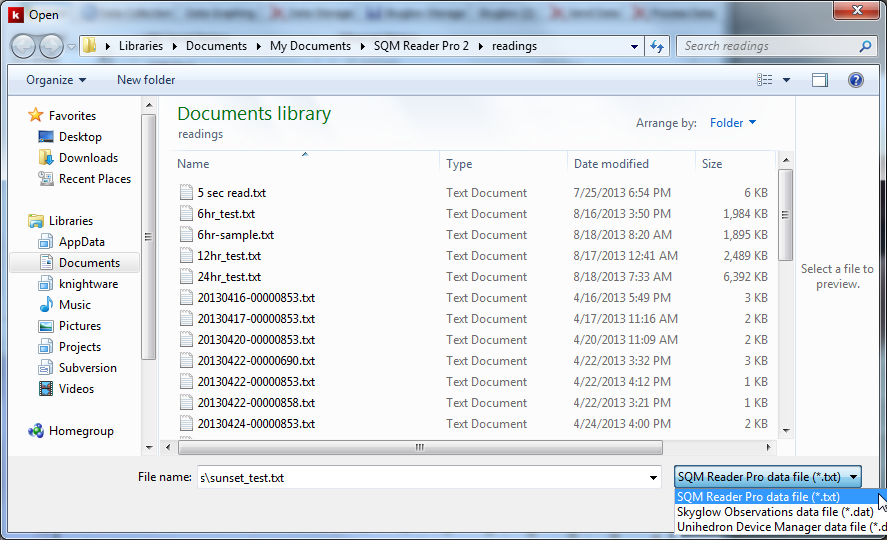
  • Open and process stored readings files. Users can open readings files stored in SQM Reader Pro format, Skyglow and Unihedron Device Manager format. Once open, the user can view graphs of the entire data file and statistics calculated for the entire file.

File | Open Dialog

  • Contribute readings to Knightware's SQM Readings Map web page. Users can elect to submit readings to the Map web page. The location of each meter installation is obscured so that the location of the actual meter remains secure. Readings cannot be submitted while the sun is above the horizon since such readings have little value.

    Detailed information is available for a meter installation by clicking on it's marker on the web page. The latest reading is displayed, along with altitude and phase of the moon. Statistics are calculated and displayed for each meter's readings. The statistics are calculated only for moonless readings.
SQM Readings Map Web Page

Availability

SQM Reader Pro 2 operates on Windows 8, 7, Vista and XP. It supports reading SQM models LE (Ethernet), LU and LU-DL (USB) and LR (RS-232). Context sensitive online help is included, as well as a printable User's Guide in PDF format.

SQM Reader Pro 2 is available directly from Knightware at http://knightware.biz/sqm

04 January 2013

The Inimitable Burnham's

A user of Deep-Sky Planner contributed 83 plan files that contained the deep-sky objects from Burnham's Celestial Handbook. I checked the plan files against my rather dog-earred 3 volume set for accuracy. Paging through these softbound copies brought back some great memories.

I purchased a softcover set in the mid-eighties when I first became an active observer. Ultimately there were 3 sets in my household - 2 for indoor use and one for outdoor use. The latter set accompanied me on most observing sessions for years. Burnham's was a great reference resource back in the days before the Internet revolutionized astronomical research for observers and astrophotographers. Those volumes never needed cellular or wi-fi signal in the field either.

My recent use of these books reminded me of 2 things:
  • What a great work this was! No wonder everyone owned a set 25 years ago.
  • Although the data in the set is dated, it is still a handy resource. I wouldn't hesitate to recommend the set to someone new to astronomy.
If Burnham's is such a nice resource, why hasn't a new edition been published? To me, a new edition should have updated object data and the printing style would be updated (using hand drawn Greek letters for double stars was always a bit quaint). I would leave Burnham's comments as they are because that is what separates this resource from others available today. I would release the books in print and as e-books.

So why hasn't a second edition happened? I suppose that the reasons are legal and economic. I suspect that the manuscript is not digitized. That means the content would have to be digitized first. I would think that this could be automated, but an investment of some man-hours would be necessary ($$$). After an accurate digitization, object data would need to be updated. That would be more man-hours ($), but probably a small fraction of the first effort. Finally, the owner of the copyrights would have to authorize a new edition or a third party would have to acquire the copyrights. According to US Copyright Office records, the copyrights were transferred from Burnham's estate to a trustee in 1996 and they endure for 70 years. Executing this step would entail legal fees ($$) and perhaps a purchase of copyrights.

I wouldn't be surprised if all of the above investment scares away would-be publishers. If my analysis is valid, a new edition of Burnham's seems very unlikely. What a shame - I would purchase an updated set without hesitation in both printed and electronic formats.

27 December 2012

Windows 8 Redux

The last post on this subject was in late October, just before the release of Windows 8, and several weeks before the release of Deep-Sky Planner 6. Now, just eight weeks later, we have a final test report on Deep-Sky Planner 6 running under Windows 8, and an emerging trend with Windows 8 sales.

First the good news

Testing has revealed no problems with Deep-Sky Planner 6 running under Windows 8 64-bit. It seems that the changes made by Microsoft to Windows didn't really affect Deep-Sky Planner. This developer is delighted not to be headed for the kind of new OS woes that occurred with Vista.

Now, the mixed news

Microsoft hasn't released actual sales figures, but Windows marketing/CFO announced in late November that 40 million licenses were sold in the first month of availability, putting it ahead of Windows 7 sales. This figure is the total number of units shipped to end users, computer manufacturers and retailers. That sounds good for MS, except that the press is full of stories of customers buying new computers with Windows 8 and returning them. We don't know how many of those 40 million units will remain sold. Computer manufacturers have been lamenting the lag in end-of-year sales compared to projections, and product reviews seem to be predominately negative or mixed at best.

Bottom line: fourth quarter 2012 sales reports should be illuminating.

Observations and minor gripes

It is blatantly obvious that the GUI design team wanted to make the UI look like that of a mobile device. Slider switches are used in place of check boxes. Live Tiles are used instead of icons. These are just semantic changes that users can deal with. The changes that seem much harder to defend involve widely used features in Windows 7 that have been obscured or removed from Windows 8.

For example, Microsoft Security Essentials (MSE) was available for Windows 7 and did a fine job of scanning, detecting and fixing viruses and malware. MSE is gone in Windows 8. Its capability has been merged into Windows Defender. Ok. Windows Defender gets virus updates and scans for malware, but the scheduler is gone.  If you don't leave your computer on all of the time, it is very likely that your computing time will be interrupted by a Windows Defender security scan. Worse, once you find Windows Defender and run it, you'll find that 'Scheduled scans' is missing from the Settings tab.

The workaround suggested by Microsoft is to use the system task scheduler to set up system scans. Wow. How many average Windows users have ever used the system task scheduler? How did this make it through usability testing? (It wouldn't have passed at Knightware.) You can do scheduled malware scans with Windows 8, but why remove a working scheduler from Windows Defender? Can you remember using any security software that didn't include a scheduling feature? I'd hate to be tech support for that one.

Bonus example: have you figured out how to get Hibernate on your shutdown menu? Mobile devices use Sleep (context saved in RAM, CPU in standby) instead of Hibernate (context saved to storage, storage device powered down, CPU in standby), so there must be no need for Hibernate to be handy. Alas, Hibernate can be configured back into the shutdown menu, but why was it exiled from there by the installer? Another hint that Microsoft really wants the mobile device market, even at the expense of their dominating position in the desktop and laptop market.

The bigger picture: the Start Menu

The trend seen by this author is that users with touch screens find the new Windows 8 UI acceptable, but there is little touchscreen hardware in the Windows user base, and there are very few applications that implement the new capabilities. Most keyboard and mouse users either use a third-party utility (e.g., Start8) to bring the Start Menu back to Windows 8, or they revert back to using Windows 7. Surely some stick with the Windows 8 Start page and learn to deal with it. This author is dealing with it but not liking it.

This suggests that there are 2 very separate high-level use cases for a personal/productivity OSes: the tablet/mobile market, and the desktop/laptop market. This is precisely the model that designers at Apple addressed with two separate products (iOS and Mac OS). Whether Microsoft designers can address these two use cases with a single product remains to be seen. It does raise the very fundamental question of why the Start Menu is not even optional with Windows 8 - it is simply gone.

The market seems to be saying that keyboard and mouse users really want Start Menu back. Touchscreen users can do without. That leaves developers watching carefully to see how this plays out.

Conclusion

The story of Windows 8 will be interesting to watch. If you use Windows, you really should watch the show. In this author's use, Windows 8 rates thusly:

Pros
  1. Starts from Sleep almost instantly.
  2. Runs some applications faster.
  3. Start page can be configured so that a very few favorite program tiles are convenient.
  4. Good for children's electronic doodling as shown in a current Windows 8 ad.

Cons
  1. UI changes for laptop and desktop installations have made using Windows more clumsy. This affects productivity, and there is not a compelling feature offered in Windows 8 that counteracts the negative impact on productivity. When is Service Pack 1 coming?

22 December 2012

Mobile Astronomy

I continue to be amused at the capabilities emerging for mobile astronomy. While there are several mobile applications available to astronomers with smartphones and tablets, the combination I have at the moment is Deep-Sky Planner on Windows 7 plus either Sky Commander (digital setting circles) or SkySafari Plus (planetarium software) on an Android phone.

I have found that I can use the extensive planning features in Deep-Sky Planner to create observing lists that I can load into Sky Commander or my phone for use with SkySafari. I am working with a push-to telescope (no GoTo).

The Sky Commander option works well for finding asteroids and other objects that aren't in the Sky Commander database. This is actually my favorite option as I have worked in push-to mode for many years with the Sky Commander and printed charts. The greatest drawback with this method is that Sky Commander identifies custom objects with only a sequential ID number. I have to keep track of ID # 1 = asteroid Toutatis, for example. Users of Argo Navis get the text name which is most helpful. Deep-Sky Planner can format custom files for upload into Argo Navis; I just don't have one.

In my use, the SkySafari option is more or less a digital notepad that also shows the sky context in which the object may be found. It works quite well even though I am operating with a few limitations:
  • I am using the intermediate version of SkySafari - not the pro version. The database is not as complete as I sometimes need. Should this become too great a limitation, I can upgrade to Pro.
  • I am using SkySafari on a smartphone. The screen is small, although it is larger than many models (it's a Motorola phone with a 4.3" screen). I don't find that the size of the planetarium view on my phone is sufficient for every target. This may not be a problem at all for others.
  • I do not use telescope control, so I rely on the coordinates given by SkySafari to use with my Sky Commander digital setting circles. I use the same technique when running Deep-Sky Planner on a laptop at the telescope.
Even with these limitations, I am able to take observing lists anywhere, anytime. It doesn't fit my needs for every observing session, but it's so darned handy! I can also log into the Deep-Sky Planner Plan Library and browse hundreds of plans with the browser on my phone. This is a terrific help when the plan prepared for the evening goes awry and a new one would serve better.

If you want to learn more about using a full-featured observing/imaging planner with SkySafari, please see this knowledgebase article on the Knightware website. It walks you through a complete example of using Deep-Sky Planner with SkySafari on an Android phone.

Search menu on SkySafari (Android) shows Custom Observing Lists

Custom list 'RASC Finest NGC Objects' uploaded from Deep-Sky Planner displayed in SkySafari (Android)