Showing posts with label dark sky. Show all posts

03 July 2017

A New Tool for Describing Sky Darkness

Sky darkness is the subject of a lot of research worldwide. Not only are astronomers interested in measuring the darkness (or brightness) of the night time sky, but governments and institutions are too, especially as it effects humans, animals and plants. Surprising results are being published constantly, including an important one for astronomers last year.

A peer reviewed article* (Atlas) was published in 2016 that included a world map of artificial light. The researchers measured sky brightness for most of the world, although they skipped the very high latitudes in both hemispheres. Measurements were made from satellite- and earth-based equipment. The light values reported in the study were reported in micro- and milli-candelas per square meter. You can read about the study at http://cires.colorado.edu/Artificial-light ; the paper is published at http://advances.sciencemag.org/content/2/6/e1600377 

Candelas are a measure of luminance, not the usual unit of measure used by astronomers. We are more familiar with magnitudes per square arc minute (MPSAS) and naked-eye limiting magnitude (NELM). Converting values among these units helps us understand the relationship between the familiar units (MPSAS or NELM) and the Atlas unit (mcd/m2). Further, the color codes used in the Atlas provide a quick, consistent way of assessing sky darkness.

Introducing Zone Calculator


SQM Reader Pro 3 includes Atlas zone color along with SQM reading values in MPSAS and NELM (and Deep-Sky Planner 7 will too, soon). While developing the feature, a testing tool was developed which is now released to the public. The software is called Zone Calculator and it is available for free at http://knightware.biz/sqm/zonecalc.htm

Hopefully this little tool will help astronomers describe the darkness of their sky in a simple, more uniform way.


25 October 2013

Dark Sky Readings

Knightware is keenly aware that light pollution is ruining stargazing for observers around the world. Measuring the darkness of the sky is useful to many pursuits beyond the simple visual observer. Astro-imagers use the measurements to estimate exposures; biologists use them to study various affects on humans and animals. The importance of gathering such data is explained in last month's post, entitled 'Why is the Skyglow Observations Standard Format Important?'.

Gathering Readings Data Automatically

Knightware added a feature to its astronomy software entitled SQM Reader Pro 2 that sends readings acquired from the user's Sky Quality Meter to the Knightware website, knightware.biz. Sending readings to this webpage is optional, and the exact location of the meter is altered a small amount to protect the privacy of the contributor.

Send reading to Knightware

Displaying Readings Data

The contributed readings data are displayed on a Google Map for public viewing at http://www.knightware.biz/community/public/sqm2/sqm_map.php. In the month since the software was released, 14,000 readings have been contributed from 9 meter installation sites. The number of readings is high because some users are contributing data as often as once per minute. Others are contributing less frequently. Readings are only accepted when the sun is below the horizon at the location of the meter.

SQM Readings Map

Knightware has been working on back-end data management tools to keep the data 'cleaned up'. Work on these tools is nearly complete. One  problem that we've already seen is that sometimes readings are submitted for a single meter at multiple meter installations over a few days. A meter installation is defined as the meter serial number, latitude, longitude and time offset from GMT. That essentially describes the hardware and it's location, and it is represented on the map as a marker with a number on it. It looks like some users change the latitude and longitude of the meter slightly to refine it's position on the map. When this pattern is detected, Knightware can move all of the readings to the meter installation that seems to be the final, corrected one. If a user sees their contributed data condensed into one map marker, that's why.

The public map displays a marker for each meter installation with a number on it. The number indicates the last reading reported for the meter location with fractional digits truncated. By clicking on a marker, a user can see the date & time of the reading in both local and universal time, the reading data in both MPSAS and NELM, and the moon's altitude and phase. The mean and standard deviation of all readings received over the latest 12 months from the meter installation with the moon below the local horizon are also shown.
Meter Installation Detail
Once the back-end tools are complete, Knightware will begin working on other tools for licensed users that will allow them to view more details of their data. Requirements for these tools are being gathered now.

Thanks!

Knightware thanks all of the SQM Reader Pro 2 users that are contributing data to the Knightware website. The goal is to provide both a publicly accessible display of the data and a more in-depth display for licensed users.

25 September 2013

Why is the Skyglow Observations Standard Format Important?

In the summer of 2012, Knightware participated in an international effort to define a standard file format for dark sky readings data. The data is also referred to as skyglow or light pollution data. After weeks of discussion, the standard was approved by the international community in September 2012 and resides online at http://www.darksky.org/night-sky-conservation/248.

Skyglow Standard document


The standard file format allows data to be collected using various devices, including the connected models of Unihedron's Sky Quality Meter, all of which are supported in Knightware's SQM Reader Pro 2 software.

These readings files can be shared with dark sky researchers worldwide who are studying various affects of light pollution. The interested parties include the astronomical institutions, observatory owners, and a large community of researchers that examine the biological effects of light pollution.

Given a standard file format, readings can be processed and placed in database repositories for use in research or simply for viewing by the public. For the first time, calibrated darkness data can be used on a wide-scale so that we can understand how light pollution is changing over time.

The Skyglow Standard describes in detail the meter installation, the contributor of the data, the license under which data is submitted and a description of the hardware. This information is followed by the reading data itself. There are further rules that define when a file is started and stopped and how it is named.

The Skyglow Storage definition tab in SQM Reader Pro 2


A skyglow file looks like a simple text file. This permits users to read the file with a simple ASCII text editor as shown below. The Standard assures that a well-defined dataset that can be submitted to data repositories anywhere in the world for various research purposes.

Skyglow Example File


Knightware is delighted to have participated in the development of the Skyglow Standard file format, and to support it in SQM Reader Pro 2 software, the only commercially available software that reads sky darkness data from Sky Quality Meters automatically and continuously, displays and graphs data, stores data in files and transfers it to an FTP server and post processing scripts, batch files and programs.

24 September 2013

Announcing SQM Reader Pro 2 software

Knightware has just released a new version of SQM Reader Pro software. SQM Reader Pro 2 is the only commercially available software that reads sky darkness data from connected Sky Quality Meters automatically and continuously, displays and graphs data, stores data in files and transfers it to an FTP server and post processing scripts, batch files and programs. Readings can be submitted automatically to a live SQM Readings Map web page at Knightware.biz.

SQM Reader Pro version 1 was released on 2009 and has had several updates. Version 2 is the result of over a year's research and development. It contains new graphing software and offers many new features.

Highlights of the new features include:

  • Numerous enhancements to data graphs. Now users can view graphs of both MPSAS (magnitude per square arcsecond) and NELM (naked-eye limiting magnitude) in real-time, and either or both graphs can be transferred to an FTP server. Lunar altitude and phase data have been added.

MPSAS Graph

NELM Graph

  • Support for the new Skyglow Observations Standard file format. The new file standard is a very important development for light pollution researchers. The next blog post will describe the Skyglow Standard and why it is important.

A Skyglow Format File
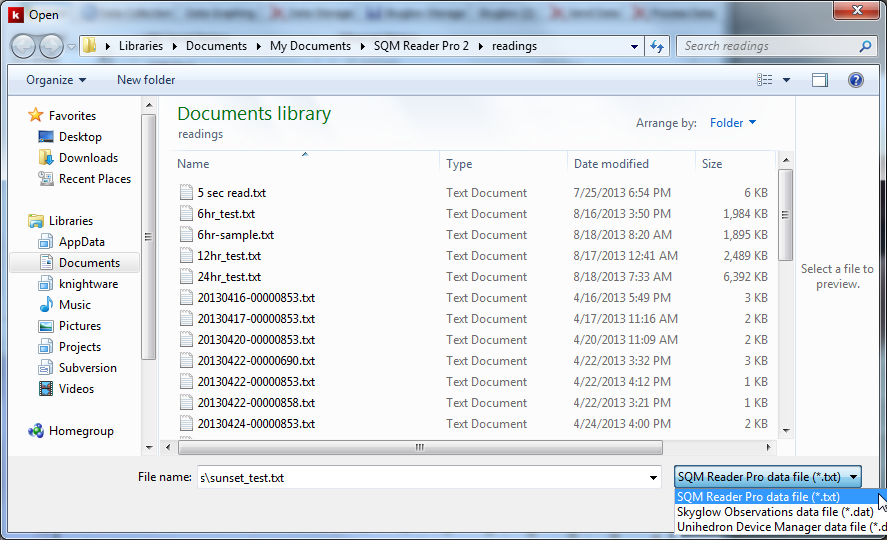
  • Open and process stored readings files. Users can open readings files stored in SQM Reader Pro format, Skyglow and Unihedron Device Manager format. Once open, the user can view graphs of the entire data file and statistics calculated for the entire file.

File | Open Dialog

  • Contribute readings to Knightware's SQM Readings Map web page. Users can elect to submit readings to the Map web page. The location of each meter installation is obscured so that the location of the actual meter remains secure. Readings cannot be submitted while the sun is above the horizon since such readings have little value.

    Detailed information is available for a meter installation by clicking on it's marker on the web page. The latest reading is displayed, along with altitude and phase of the moon. Statistics are calculated and displayed for each meter's readings. The statistics are calculated only for moonless readings.
SQM Readings Map Web Page

Availability

SQM Reader Pro 2 operates on Windows 8, 7, Vista and XP. It supports reading SQM models LE (Ethernet), LU and LU-DL (USB) and LR (RS-232). Context sensitive online help is included, as well as a printable User's Guide in PDF format.

SQM Reader Pro 2 is available directly from Knightware at http://knightware.biz/sqm