Showing posts with label astronomy software. Show all posts

03 July 2017

A New Tool for Describing Sky Darkness

Sky darkness is the subject of a lot of research worldwide. Not only are astronomers interested in measuring the darkness (or brightness) of the night time sky, but governments and institutions are too, especially as it effects humans, animals and plants. Surprising results are being published constantly, including an important one for astronomers last year.

A peer reviewed article* (Atlas) was published in 2016 that included a world map of artificial light. The researchers measured sky brightness for most of the world, although they skipped the very high latitudes in both hemispheres. Measurements were made from satellite- and earth-based equipment. The light values reported in the study were reported in micro- and milli-candelas per square meter. You can read about the study at http://cires.colorado.edu/Artificial-light ; the paper is published at http://advances.sciencemag.org/content/2/6/e1600377 

Candelas are a measure of luminance, not the usual unit of measure used by astronomers. We are more familiar with magnitudes per square arc minute (MPSAS) and naked-eye limiting magnitude (NELM). Converting values among these units helps us understand the relationship between the familiar units (MPSAS or NELM) and the Atlas unit (mcd/m2). Further, the color codes used in the Atlas provide a quick, consistent way of assessing sky darkness.

Introducing Zone Calculator


SQM Reader Pro 3 includes Atlas zone color along with SQM reading values in MPSAS and NELM (and Deep-Sky Planner 7 will too, soon). While developing the feature, a testing tool was developed which is now released to the public. The software is called Zone Calculator and it is available for free at http://knightware.biz/sqm/zonecalc.htm

Hopefully this little tool will help astronomers describe the darkness of their sky in a simple, more uniform way.


09 December 2016

Deep-Sky Planner 7.1 Release

A free update to Deep-Sky Planner 7 has been released. It contains bug fixes, enhancements and new features. The list of changes is available in the release notes that can be viewed in the Deep-Sky Planner 7 Community (Software Updates page), and in the Readme file that accompanies the update.


This release has some important changes that require some explanation. First, support for ASCOM weather stations has been added. I tested with both the BlueAstro Stickstation and the Astromi.ch MeteoBox. As you may know, the developer of the Stickstation, Per Frejvall, died unexpectedly in July. I had corresponded with Per and worked out communication issues before he passed. I have since worked with Martin Ingold at Astromi.ch on support for MBox. Both Mbox and StickStation are working well with DSP7.1.

MeteoBox (MBox)

Deep-Sky Planner 7 was released with internal support for high resolution displays. The user interface was sufficient where Windows scaling was 150% or less. Because the user interface was not sufficient where scaling was above 150%, I have elected to make internal support for high resolution displays an option within Deep-Sky Planner. I will improve internal support for high-resolution displays as Windows and development tools improve support for high res displays.

Lastly, the database has been updated with new cross reference information for NGC globular clusters. There were incorrect references between NGC and GCL catalogs for globular clusters. If you have created any observing plan documents that include GCL objects, you may want to be sure that the object information is correct. Please look for a new Terzan Clusters plan and an updated Palomar Clusters plan in the Plan Library in a few days. My thanks go to Owen B for reporting this issue.

27 January 2016

Generating a Horizon Model for Deep-Sky Planner

A Deep-Sky Planner user has contributed a method for creating a highly accurate horizon model for his suburban imaging location. The location has many obstructions that often interfere with imaging projects. Knightware thanks Deep-Sky Planner user Mark L. for contributing the following method.

At your observing location, set up a camera with a wide angle lens on a tripod.  I used a DSLR and an 18mm lens.  Make sure the date/time is set correctly on the camera.

Level the tripod, then set the altitude of the camera so that the local horizon can be seen in all directions.  This makes the process easier since you don't have to readjust the altitude on each shot.

Determine a proper exposure time.  I used 10 seconds at f/2 and ISO 800 in a fairly light polluted area (NELM 4.8).  I got magnitude 5 and 6 stars with these settings.

Take an exposure, then move the azimuth of the camera about 30 degrees and expose again.  Do this until you have covered the entire horizon around the camera's location.

At your computer, start up your planetarium program setting the date/time to match the photos you just took. I used TheSky6, but other planetarium programs can also be used.


Star information from TheSky6

Examine each photo, looking for a star that can be seen just above key points on your horizon.  Find that star on the planetarium program.  Click on the star to get the azimuth and altitude, then record these values using a plain text editor such as Notepad.

It is important to record the data in azimuth, altitude order with a comma separating the values because this is the format that Deep-Sky Planner expects. TheSky6 produces data in degrees, minutes, seconds format, so I wrote a script that turns the data in the text file into decimal degrees format for Deep-Sky Planner.

Python scripts are available to convert the data taken from TheSky (either TheSky6 or TheSkyX) to Deep-Sky Planner format. You can download these and sample input and output files at http://www.knightware.biz/community/public/dsp6/kb/article-31.htm


Python script that converts data from TheSky 6

Repeat the examination process for as many points as possible around your horizon. The more points you record, the more accurate the model.

Import the list of Az/Alts into Deep-Sky Planner. Open the location in the Location Manager that you want to attach the horizon model to in the Location Editor. Click Import to open the Horizon Model Import dialog box. Choose the Input File that contains your horizon model data, choose Comma Separated Azimuth/Altitude format, and enter a name for the new model. Click Import to pull the horizon into the Deep-Sky Planner database.

Horizon Model Import dialog box

Save the original data file or Export the horizon model to a .horizon data file using the Location Editor in case you need to import the model again in the future.

27 July 2015

Southern Hemisphere Observing

An observing plan called "RASC Southern Splendours" was posted recently to the Deep-Sky Planner Plan Library. The plan is based on an article of the same name from the "Observer's Handbook 2013" by the Royal Astronomical Society of Canada. The plan contains 75 showpiece objects that are visible to southern hemisphere observers. The most northerly object in the list is M 83 at -29° declination; the most southerly are at -72° (there are several, including the Small Magellanic Cloud).

Small Magellanic Cloud
Image credit: NASA/CXC/JPL-Caltech/STScI

We northern hemisphere observers often lament the great observing targets that are enjoyed by our southern hemisphere counterparts but not visible to us. I've read recently of the ongoing show displayed by comet C/2014 Q1 (PANSTARRS), and I admit to some envy.

While southern observers can enjoy the "Splendours" plan anytime, we northerners can make the trek south to enjoy it too. Such is the case with a small group of long time friends who are headed to the 2016 OzSky Star Safari in April. Unfortunately, those dates collide with the Northeast Astronomy Forum (NEAF) for me, but that's another story.

I look forward to hearing about the observing at OzSky, and I look forward to making the trip myself in the future. Whether you live in the southern hemisphere or not, the "Splendours" plan is available to all Deep-Sky Planner users now, and I hope observers north and south find an opportunity to use it.

09 March 2015

Introducing The Herschel Sprint

Mark Bratton, author of The Complete Guide to the Herschel Objects, wrote a fascinating piece in the April issue of Sky & Telescope that describes a very productive night of observing by William and Caroline Herschel in April 1785. Entitled "William Herschel's Extraordinary Night of Discovery", the article describes how the Herschels conducted observations of 74 objects in a single night. The article includes comments about each object, making it a highly recommended read. Once you've read the article, it feels like you've observed with William and Caroline - a very neat thought.

This season of the year has it's Messier Marathon, but if you've mastered that, the 'Herschel Sprint' offers a similar but greater challenge. The Sprint is a very inviting and historically interesting project for modern observers with 15 inch or larger telescopes. (The Herschels accomplished their feat with an 18 inch speculum metal reflector.) You can read more about the Herschel Sprint from Sky & Telescope editor Susan Johnson-Roehr. Licensed users of Deep-Sky Planner can download the Herschel Sprint observing plan from the online Plan Library now. The plan contains all 74 objects from the article along with modern object data.

The Herschel Sprint Observing Plan
Pursuing the Herschel Sprint with Deep-Sky Planner gives the modern observer many advantages - GoTo telescope slewing, managed object images, inter-operation with planetarium software and automated logging. One can only imagine what William and Caroline might have done with GoTo and automated logging!

Knightware thanks Sky & Telescope magazine for granting permission to use data from this special article to create an observing plan for Deep-Sky Planner users.

21 July 2014

Deep-Sky Planner Q&A Webinar - July 2014

July Webinar - Double Star Designations
The latest Deep-Sky Planner webinar was held Saturday, July 19. It addressed a question submitted by a user about searching for double stars in Deep-Sky Planner. Double star designations take a wide variety of forms so searching for them can be tricky. The goal of the webinar was to answer this question and share some tips on searching for double stars effectively in Deep-Sky Planner.

Search tools and methods were discussed, including searching by Bayer number, WDS and CCDM numbers, and using wildcards in designations. A few advanced methods were also discussed. The webinar lasted 16 minutes.

The webinar is available now for replay viewing at:
Viewers that are logged into their Google+ accounts can leave comments about the webinar on the deepskyplanner Google+ page or on the deepskyplanner YouTube channel.

Thanks for watching!

24 March 2014

Deep-Sky Planner Q&A Webinar


Knightware held a Deep-Sky Planner Q&A webinar on Saturday, March 22. It was delivered worldwide via Google+ Hangouts. The broadcast allowed Knightware to answer users' questions directly as we would when speaking face to face at star parties and trade shows.

The webinar replay is available now at several locations:
Current users were asked to submit questions in advance, and they were all related to creating observing lists. The first question was how to select variable stars by magnitude, constellation, spectral type and visibility at a given time and place. The demonstration showed how to select a base list of objects using the star search document. The results were copied into an observing plan document for real-time use at the telescope. The observing plan document allowed the user to compute ephemeral data like altitude and azimuth continuously, so the list was filtered by minimum altitude and sorted by best time to view. Using this strategy, the user could work through an observing list as best suited their time and site constraints.

The second question was much like the first, except that the user was interested in double stars and wanted to specify a range of separation angles. The demonstration proceed much like the first, except that a maximum separation angle of 2 arc seconds was used to create the initial list. These results were copied to an observing plan so that the user could apply the same real-time filters and sort options as described above.

The third and final question was a bit different from the previous ones. The user wanted to make an observing list for a public observing session. Since the public is usually interested in brighter objects, we created a deep-sky search document and searched for objects in the Messier catalog that were at least magnitude 9 or brighter. A time and place for the ephemeral calculations was selected and the results were limited to objects at an altitude of at least 20 degrees. The resulting list could be sorted and filtered further as needed.

Over the course of the webinar, we showed some other features that helped users, like object drag and drop between reports, DSS image acquisition, daily object altitude graphs and object cross reference lookup (which provided detailed data for a variable star that also appeared in the Carbon Star catalog). Of further interest to star observers, we showed predicted date & time of light extrema for variables and high precision ephemerides for double stars.

Knightware plans to have further webinars - perhaps quarterly. We will solicit questions from users in advance so that demonstrations are concise. Next time, we will accept comments and minor questions from viewers during the webinar through Google+. While anyone can view the webinar, it should be noted that viewers will need to have a Google+ account and follow the deepskyplanner Google+ page to submit questions during the broadcast. They will also receive an invitation to the webinar automatically.

Special thanks go to our friend Michael Kidd and the folks at Astronomy magazine for answering questions about using Google+ for the webinar. Your help made the webinar possible.

12 December 2013

Astronomy Films

Knightware has made minor contributions to the making of two films in the recent past. One film has been released, the other will be released next summer. In each case, the filmmakers are providing some very impressive entertainment for amateur astronomers.

The first film is Ces Fous d'Astronomie (translated: "those crazy about astronomy"). It is a 60 minute film about astronomers, and it is available now on DVD from http://www.fousdastro.com/. Knightware contributed a copy of SQM Reader Pro in support of the project.

The film highlights several astronomers in their quest to view and image the night skies. Several well-known amateur and professional astronomers appear in the movie (Christian Buil, Thierry LeGault, Nicolas Outters, Hubert Reeves, André Brahic). You'll need to brush up your French for this one - it is in French with no subtitles and is beautifully produced. You can learn more and view a trailer at http://www.fousdastro.com/.

Used by permission of SV2 Studios
The second film is In Saturn's Rings. This is a unique production - taking over a million images produced by Hubble Space Telescope and various spacecraft, and processing them into an IMAX format film. The film will include a professionally written score performed by the Greensboro (NC) Symphony Orchestra, giving a real treat to eye and ear.

The film is due to be released in summer 2014, but snippets have been available for viewing over recent years. The snippets have been nothing less than stunning! You can learn more about the film and view a trailer at http://www.insaturnsrings.com/home/. The film also has a presence on Facebook, Google+, Twitter and YouTube.

Knightware (Phyllis) met the filmmaker a few years ago and was extremely impressed with his talent and vision.  Knightware made a financial contribution in support of this project.

Each of these films deserves the support of the amateur astronomy community. We hope you enjoy them!

09 December 2013

Free Meter Tools in the SQM Reader Pro Community

A new page has been published to the SQM Reader Pro 2 Licensed Users' Community. You can reach it by clicking Help | Community Page in SQM Reader Pro 2, or by visiting http://knightware.biz/community/loginfm.php and entering your log in credentials. These pages are available only to licensed users, and they provide a free service to users that upload readings to the public SQM Readings Map page. These pages are also available through the browser on any mobile device. The new page is called Meter Tools and is available from the community menu.

Community Home page

Once you reach the Meter Tools page, you can view a record of your meter installation(s). Please note that there may be multiple entries for your meter serial number. If you have used your meter at different locations, there should be multiple entries. Furthermore, when you change the timezone offset in SQM Reader Pro, perhaps for daylight saving time, this also generates an additional meter installation in the database.

If you have changed the location of your meter in SQM Reader Pro to correct an error, that also generates an additional meter installation. If you have this issue and wish to collate all readings under one location, please send an email to Knightware and we can do this for you. Please include the meter serial number and the correct location, enclosure offset and timezone offset for your meter.

Please note the Obfuscated column in the Meter Tools page. This indicates whether the true location of your meter is used or altered when displayed on the public SQM Readings Map page. Meter installation locations are obfuscated by default to protect the security of the installation. If you wish to have the true location of the meter installation displayed on the Map, please send Knightware an email and we can make this change for you. Be sure to indicate the meter serial number and other installation details.


Meter Tools page


You can view a Meter Readings Digest of your data over the last 30, 90 or 365 days by clicking the appropriate link on the Meter Tools page. The digest includes a graph of the selected meter's readings and a brief statistical analysis of the readings sample. Please note the graphing software renders the graph on demand. If you have a large number of readings (> 20,000) in the selected sample, the graph may not render because it may exceed the computation time limit for the software. If you have a moderate sized sample, please give the graphing software time to complete its rendering.


90 Day Graph & Statistics


02 December 2013

More Improvements to the Knightware Website

More improvements have been published on the Knightware website. Most noticeable are the changes to the menus throughout the site. The old menus were not friendly to mobile browsers - the drop-down capability that exposed subtopic pages didn't work on mobile browsers. The new menus are mobile-friendly so that the entire site can be navigated efficiently on a phone or tablet. The site has been reviewed with 7 & 10 inch tablets, and all appears well. In fact, you can still view an abbreviated version of any observing plan in the Plan Library with your mobile device browser - just log into the User's Community and browse.

New mobile-friendly menus

SQM Reader Pro Community Updates

Plans are underway to provide new tools for users of SQM Reader Pro 2 that contribute data to the SQM Readings Map page. Users have already contributed over 66,000 readings, and the new tools will help users understand their data in new ways. Tools should begin to appear in the SQM Reader Pro 2 user's community soon - please stay tuned.

Getting More Social

You may notice that social bookmarking buttons have been added to the bottom of most web pages. These buttons will help users to bookmark the pages that are most beneficial to them while sharing links to these pages with friends. We have also added a 'Link To Us' page that we hope will encourage users to share information about Deep-Sky Planner and SQM Reader Pro with others. We thank you in advance for sharing links to the website!

Link To Us page

Introducing: deepskyplanner on Google+

Finally, there is a new deepskyplanner page on Google+. We expect to use this page initially like our page on Facebook - to share announcements about new observing plans, new product features, etc. We will monitor the popularity of the Google+ page and consider using the vast array of features that Google+ offers in the future. Please add the deepskyplanner page to your circles!


08 November 2013

Improvements to the Deep-Sky Planner Community

Some improvements appeared this week in the Deep-Sky Planner Licensed Users' Community at knightware.biz. The improvements appeared in the Observing Plan Library and the Equipment Library. The changes make viewing data more efficient.

The old library viewing pages allowed users to page through items in the library. Items were listed in alphabetical order, 10 items per page. The libraries have grown in size so that paging through the data was no longer a sufficient way to navigate the contents.

The new library viewing pages are much more suited to the number of items in the libraries. Now items in a library can be sorted, filtered and searched. Users can also set the number of items viewed per page so that there is far less paging through the library while looking for plans and equipment. For example, the Plan Library can be filtered for plans whose names contain the word 'binocular', or the plans can be sort by their upload date. These capabilities should make using the Plan Library much easier as it continues to grow in size.

Observing Plan Library web page

Speaking of Growth

The Deep-Sky Planner 6 Plan Library has grown to nearly 300 pre-built observing plans. There are plans related to observing books, star parties and organizations. There are also plans that accompany popular monthly magazines and online articles:
  • Binocular Universe (cloudynights.com): Plans that accompany Phil Harrington's monthly 'Binocular Universe' article on CloudyNights.com have been added to the Plan Library since December 2012. These plans hold a nice mix of objects for binocular observers every month.
  • Deep-Sky Tour (Sky At Night magazine): Plans that accompany Steve Richards' monthly 'Deep-Sky Tour' column in Sky At Night magazine have been added to the Library since December 2011. These plans contain objects appropriate for small telescope observers. The plan file also appears on the coverdisc CD that accompanies each issue, along with a version of the plan file for Argo Navis devices. They are located in the Software section of the CD.
  • New! Deep-Sky Wonders (Sky & Telescope magazine): Plans that accompany Sue French's monthly 'Deep-Sky Wonders' column in Sky & Telescope magazine are being added to the Plan Library starting December 2013. These plans contain objects appropriate for medium to large sized telescopes every month.

These plans are very handy to use when you are working through an observing list in a magazine or a book, or you haven't had time to prepare a custom plan of your own. They can also be viewed by licensed users with a web browser on any mobile device directly from the Plan Library.

25 October 2013

Dark Sky Readings

Knightware is keenly aware that light pollution is ruining stargazing for observers around the world. Measuring the darkness of the sky is useful to many pursuits beyond the simple visual observer. Astro-imagers use the measurements to estimate exposures; biologists use them to study various affects on humans and animals. The importance of gathering such data is explained in last month's post, entitled 'Why is the Skyglow Observations Standard Format Important?'.

Gathering Readings Data Automatically

Knightware added a feature to its astronomy software entitled SQM Reader Pro 2 that sends readings acquired from the user's Sky Quality Meter to the Knightware website, knightware.biz. Sending readings to this webpage is optional, and the exact location of the meter is altered a small amount to protect the privacy of the contributor.

Send reading to Knightware

Displaying Readings Data

The contributed readings data are displayed on a Google Map for public viewing at http://www.knightware.biz/community/public/sqm2/sqm_map.php. In the month since the software was released, 14,000 readings have been contributed from 9 meter installation sites. The number of readings is high because some users are contributing data as often as once per minute. Others are contributing less frequently. Readings are only accepted when the sun is below the horizon at the location of the meter.

SQM Readings Map

Knightware has been working on back-end data management tools to keep the data 'cleaned up'. Work on these tools is nearly complete. One  problem that we've already seen is that sometimes readings are submitted for a single meter at multiple meter installations over a few days. A meter installation is defined as the meter serial number, latitude, longitude and time offset from GMT. That essentially describes the hardware and it's location, and it is represented on the map as a marker with a number on it. It looks like some users change the latitude and longitude of the meter slightly to refine it's position on the map. When this pattern is detected, Knightware can move all of the readings to the meter installation that seems to be the final, corrected one. If a user sees their contributed data condensed into one map marker, that's why.

The public map displays a marker for each meter installation with a number on it. The number indicates the last reading reported for the meter location with fractional digits truncated. By clicking on a marker, a user can see the date & time of the reading in both local and universal time, the reading data in both MPSAS and NELM, and the moon's altitude and phase. The mean and standard deviation of all readings received over the latest 12 months from the meter installation with the moon below the local horizon are also shown.
Meter Installation Detail
Once the back-end tools are complete, Knightware will begin working on other tools for licensed users that will allow them to view more details of their data. Requirements for these tools are being gathered now.

Thanks!

Knightware thanks all of the SQM Reader Pro 2 users that are contributing data to the Knightware website. The goal is to provide both a publicly accessible display of the data and a more in-depth display for licensed users.

25 September 2013

Why is the Skyglow Observations Standard Format Important?

In the summer of 2012, Knightware participated in an international effort to define a standard file format for dark sky readings data. The data is also referred to as skyglow or light pollution data. After weeks of discussion, the standard was approved by the international community in September 2012 and resides online at http://www.darksky.org/night-sky-conservation/248.

Skyglow Standard document


The standard file format allows data to be collected using various devices, including the connected models of Unihedron's Sky Quality Meter, all of which are supported in Knightware's SQM Reader Pro 2 software.

These readings files can be shared with dark sky researchers worldwide who are studying various affects of light pollution. The interested parties include the astronomical institutions, observatory owners, and a large community of researchers that examine the biological effects of light pollution.

Given a standard file format, readings can be processed and placed in database repositories for use in research or simply for viewing by the public. For the first time, calibrated darkness data can be used on a wide-scale so that we can understand how light pollution is changing over time.

The Skyglow Standard describes in detail the meter installation, the contributor of the data, the license under which data is submitted and a description of the hardware. This information is followed by the reading data itself. There are further rules that define when a file is started and stopped and how it is named.

The Skyglow Storage definition tab in SQM Reader Pro 2


A skyglow file looks like a simple text file. This permits users to read the file with a simple ASCII text editor as shown below. The Standard assures that a well-defined dataset that can be submitted to data repositories anywhere in the world for various research purposes.

Skyglow Example File


Knightware is delighted to have participated in the development of the Skyglow Standard file format, and to support it in SQM Reader Pro 2 software, the only commercially available software that reads sky darkness data from Sky Quality Meters automatically and continuously, displays and graphs data, stores data in files and transfers it to an FTP server and post processing scripts, batch files and programs.

24 September 2013

Announcing SQM Reader Pro 2 software

Knightware has just released a new version of SQM Reader Pro software. SQM Reader Pro 2 is the only commercially available software that reads sky darkness data from connected Sky Quality Meters automatically and continuously, displays and graphs data, stores data in files and transfers it to an FTP server and post processing scripts, batch files and programs. Readings can be submitted automatically to a live SQM Readings Map web page at Knightware.biz.

SQM Reader Pro version 1 was released on 2009 and has had several updates. Version 2 is the result of over a year's research and development. It contains new graphing software and offers many new features.

Highlights of the new features include:

  • Numerous enhancements to data graphs. Now users can view graphs of both MPSAS (magnitude per square arcsecond) and NELM (naked-eye limiting magnitude) in real-time, and either or both graphs can be transferred to an FTP server. Lunar altitude and phase data have been added.

MPSAS Graph

NELM Graph

  • Support for the new Skyglow Observations Standard file format. The new file standard is a very important development for light pollution researchers. The next blog post will describe the Skyglow Standard and why it is important.

A Skyglow Format File
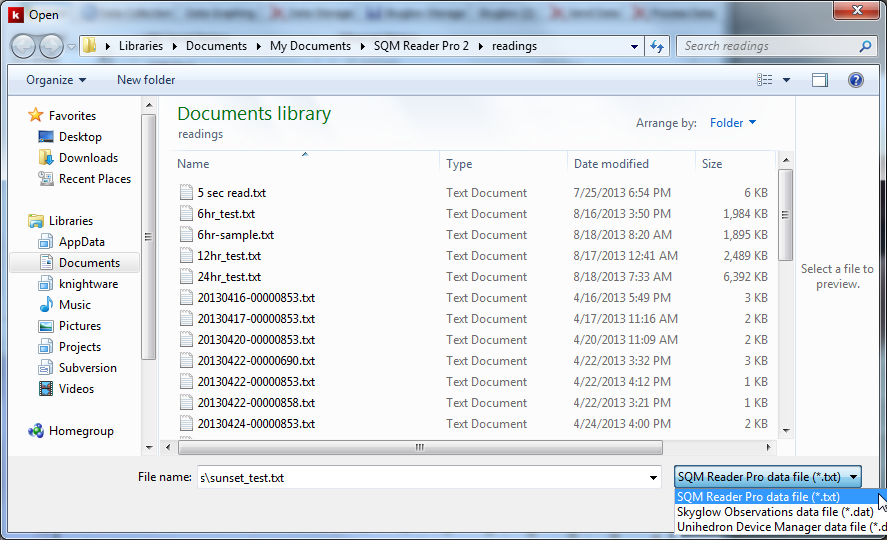
  • Open and process stored readings files. Users can open readings files stored in SQM Reader Pro format, Skyglow and Unihedron Device Manager format. Once open, the user can view graphs of the entire data file and statistics calculated for the entire file.

File | Open Dialog

  • Contribute readings to Knightware's SQM Readings Map web page. Users can elect to submit readings to the Map web page. The location of each meter installation is obscured so that the location of the actual meter remains secure. Readings cannot be submitted while the sun is above the horizon since such readings have little value.

    Detailed information is available for a meter installation by clicking on it's marker on the web page. The latest reading is displayed, along with altitude and phase of the moon. Statistics are calculated and displayed for each meter's readings. The statistics are calculated only for moonless readings.
SQM Readings Map Web Page

Availability

SQM Reader Pro 2 operates on Windows 8, 7, Vista and XP. It supports reading SQM models LE (Ethernet), LU and LU-DL (USB) and LR (RS-232). Context sensitive online help is included, as well as a printable User's Guide in PDF format.

SQM Reader Pro 2 is available directly from Knightware at http://knightware.biz/sqm

03 May 2012

The Elusive Implication of Surface Brightness

I saw the following question on CloudyNights.com regarding the visibility of extended objects and surface brightness:
"What I am interested in is finding some way to calibrate surface brightness to the chances of seeing the object in my scope."

This seems to be a popular feature for planning software. I find it a fascinating topic and I have studied it myself. My general feeling is that the ideas described in Roger Clark's Visual Astronomy of the Deep Sky help to address the question, but these alone are insufficient.

I was delighted to see this response to the question above from Sky & Telescope's Tony Flanders:
"Nobody can give you a formula that will accurately predict an object's visibility -- thank heavens!"
He also explains:
"Another way of looking at it is that the aperture of your telescope places a limit on the total magnitude of the objects you can see. And the quality of your skies places a limit on the surface brightness of the objects you can see."
I like Flanders' analogy. Clark's ideas describe the importance of the difference in contrast between the sky and the extended object. My own study has also identified several additional metrics: sky conditions, weather, personal visual acuity and sensitivity. It is indeed hard to fit all of these elements into a mathematical model that accurately predicts whether an object can be observed.

A visibility prediction feature will find its way into Deep-Sky Planner, though I am still studying the problem now. When it is released, I will state plainly that the prediction is only a model that invites further improvement over time. I truly doubt that a completely accurate model will ever be devised, so an adaptable model is probably the best we can do. That is the current requirement in the Deep-Sky Planner development plan.

29 November 2011

Two Great Gift Suggestions for Astronomers

Great gift #1: Deep-Sky Wonders by Sue French

I recently picked up a copy of Sue French's new book, Deep-Sky Wonders, and it has more than exceeded my expectations for an observing guide.

The book is a beautiful hardback production with high quality paper. All of that is justified as the pages are full of Sue's experienced narrative, sky charts that illustrate the positions of the objects, and color photos by some of the world's most renowned astro-imagers. The variety of objects is rich and the artistry is enticing.

There is more to this suggestion than just the book though. Plan files are being completed now for use with Deep-Sky Planner that go along with the book. These plans contain essential information for hundreds of objects mentioned in the book, along with page reference numbers from the book. Together, the book and the plans equip Deep-Sky Planner users to work through observing and logging many of the finest observing targets in the night sky.

This project would not have been possible without the help of Sue French and Deep-Sky Planner user John Sillasen. Thank you both for your gracious help.

Great Gift # 2: SkySafari 3

I recently got a copy of SkySafari 3 for Mac OS X to test importing of plans produced by Deep-Sky Planner. DSP's plan files can be converted to the observing list format needed by SkySafari.

Testing went well on the Macbook running Mac OS X, but what really got my attention was playing with SkySafari on a smartphone. The import feature isn't ready yet for smartphones, but the application itself is amazing! I don't feel that the small device platform will completely supplant use of planetarium apps on a desktop or laptop, but it is a useful aid for observers on the go.

Southern Stars says they will have SkySafari out for Android ASAP, perhaps by the end of December. You couldn't go wrong giving this app to an astronomer that uses a smartphone or tablet.